
BACK TO SCHOOL NEWSLETTER
|
|
Dear Goodman Middle School Community,
I am thrilled to extend a heartfelt welcome to you and your family as we embark on another exciting school year at Goodman Middle School. With great anticipation, we look forward to starting this journey with all our valued Roadrunners.
My name is Ty Robuck, and I have the honor of serving as your child's principal. This marks my seventh year in this role at Goodman, a school that holds a special place in my heart. Growing up in this community and being a student at Goodman when it first opened its doors in 1991, I feel deeply connected to its history and its future.
With a combined experience of 10 years in teaching and 15 years in administration, I am dedicated to ensuring the success and well-being of our students. My wife, our three children, and I reside in Gig Harbor, cherishing our bond with this vibrant community.
I eagerly anticipate the opportunity to support and guide your children this year. Please feel free to reach out to me with any questions or concerns you may have. To keep you well-informed, I will be sharing a monthly newsletter, brief video updates, and Parent Square notifications. I kindly ask that you take a moment to review these updates, and remember that I am always available for a phone call should you need assistance.
Respectfully,
Ty Robuck Principal, Goodman Middle School
 |
Welcome Roadrunner Nation!
Before the first day of school, here are some important items students will want to know in advance:
School starts at 8:15 and ends at 2:45 (9:15 - 2:45 on Wednesdays). September 4th is a late start.
Your student ID number and password - if you are brand new to our district you will be able to get that from our librarian on your first day
Your schedule - check it in your portal the night before school in case changes have been made, and it helps to print a copy or write it down to reference
Check out this chart for the bell schedule. Bell Schedule 2024-2025
Your 4th period class determines what lunch you have - check this chart for your lunch once you have your schedule: GMS Lunch Schedule 2024-2025
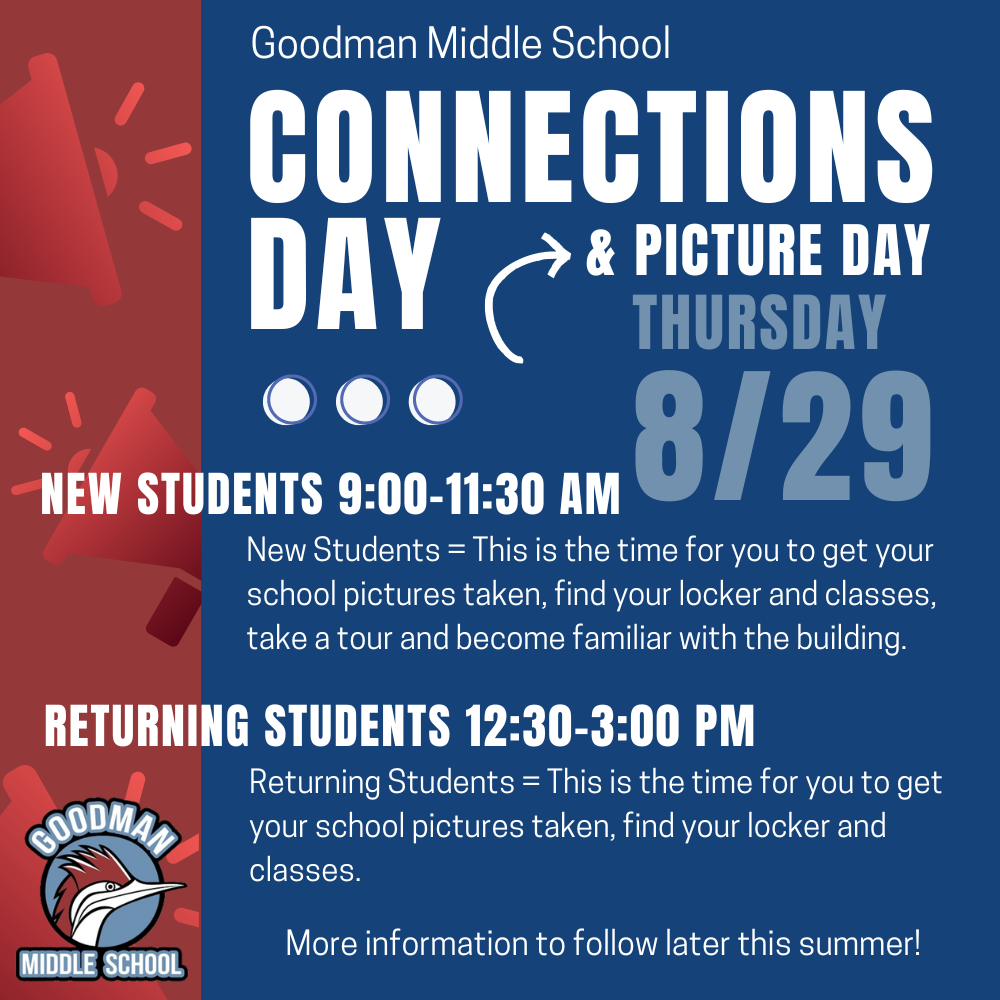
Use our building map to get familiar with your classrooms (a copy will be printed on your schedule on Aug. 30): GMS Building Map
Your address and parent phone numbers - write it down where you can find it easily
Your bus number- go to Transportation Webpage and follow the instructions, or call Transportation at (253) 530.3900
Your after school plan to get home - bus or parent pick-up, make sure you know before you get to school in the morning!
Charge your chromebook overnight so it's fully charged for school each day
Know your locker number and combination (you can find this in your portal and it will be printed on your schedule when you pick it up on August 29th)
Please don’t come to school if you are not feeling well. If you get to school and find you don’t feel well, check in the Health Room in the Main Office
You can bring a refillable water bottle - we currently have one water bottle filling station located by the Library and we will be getting another one by the office soon. You can also find drinking fountains around the building as well.
Your counselor's name - Mrs. Kjelstad for students with last names A - K and Mrs. Nemecek for students with last names L - Z
Parent Drop-Off and Pick-Up Zones:
Our parking lot is a busy place before and after school, and when cars get backed up in the street it blocks our buses from being able to get through to the school. We ask that parents coming for drop-off and pick-up please pull forward beyond the main entry and move all the way down to the flagpole to make room for more cars to pull forward, or park in a parking space and have your student come out to your car to ease traffic congestion from backing out into the street. We appreciate your help!
New Guest and Volunteer Sign In Procedure
Part of our Safe Schools Initiative, we have added a new student and guest sign in procedure. If you are a guest or volunteer to our building,, you will be asked to sign in with your state identification. Stay tuned for more information to come in the near future.
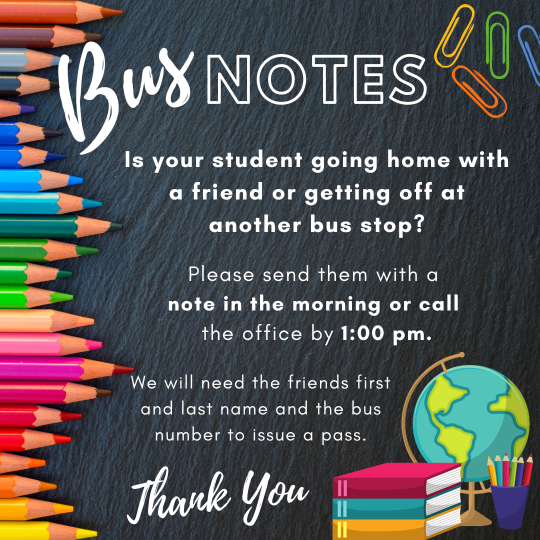
Bus Information from Transportation
Parents please look up your students bus stop information prior to the first day of school. You can access this information here:
To find your bus stop, you will need your students ID# and DOB.
If you have any questions or concerns about your child's bus stop, please contact Transportation at (253) 530-3900.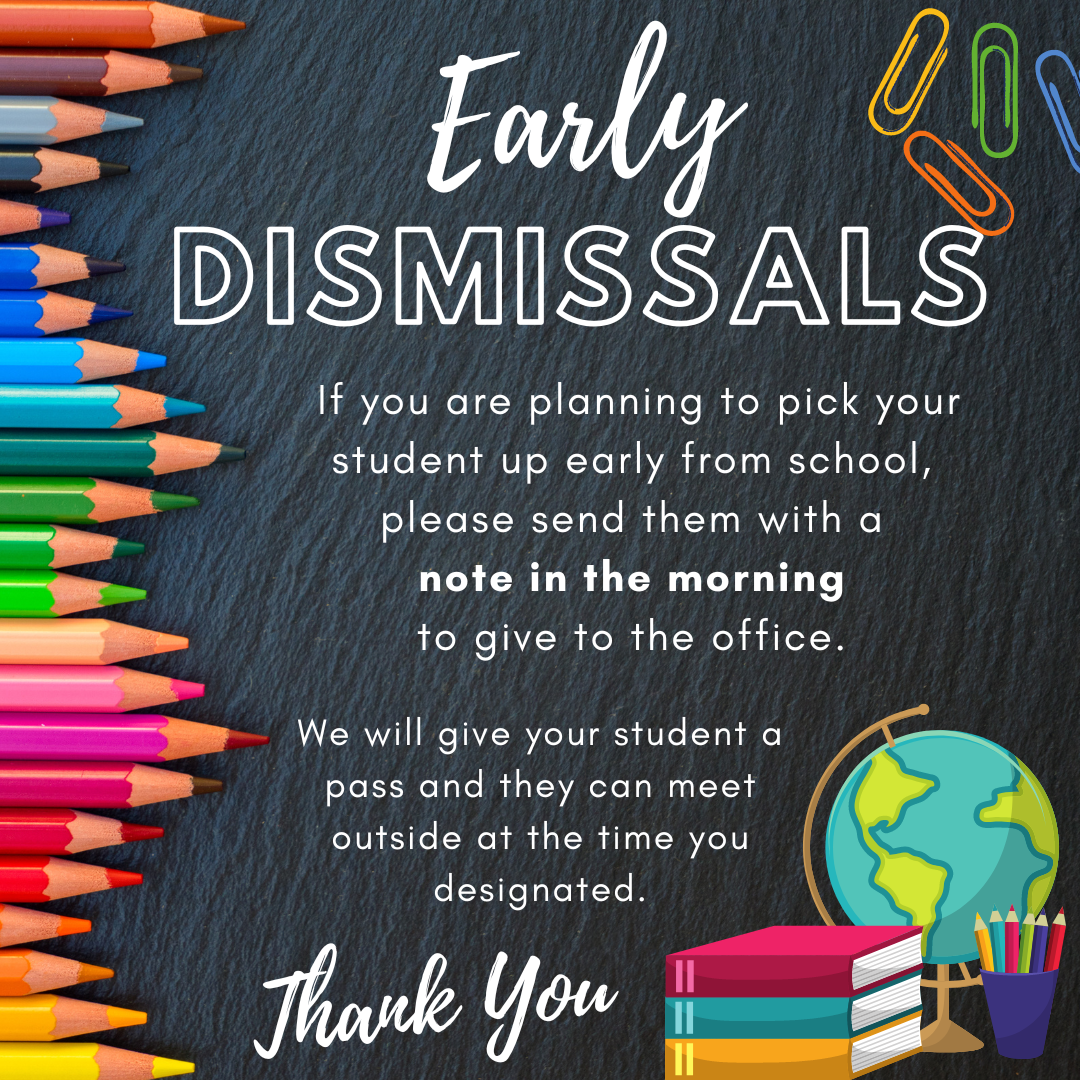 |
 |

Dress Code
Students are expected to dress appropriately for school. The District Dress Code applies to ALL school days and at ALL school events:
Do not wear clothing or accessories that present a health or safety hazard or would damage school property.
Clothing must cover the torso/midriff, cleavage, and undergarments.
Clothing, accessories or displays associated with gang affiliated behavior are not permitted.
Sunglasses are not to be worn indoors.
Clothing, accessories such as face coverings, or jewelry that displays or promotes alcohol, tobacco, drugs, weapons, illegal actions, or obscene and vulgar messages or interrupts the educational process are not permitted.

PARENT PORTAL
The Peninsula School District (PSD) uses PowerSchool, a secure web-based system for our Parent Portal and student information system. We recently upgraded the way we store contact information in PowerSchool in order to provide more accurate information and faster communication in case of an emergency.
As we complete the upgrade process, we need all parents and legal guardians to update their contact information for each student.
What does this mean for me?
It is essential that you log in to the PowerSchool account you have for each student in your family. If you do not update each student’s contact information you run the risk of missing important information from your student’s school and PSD including emergency and weather-related information.
What should I do?
Please log in to your PowerSchool Parent Portal by navigating to the PSD website, then select the Portals dropdown (from the top navigation bar) and select Parent Portal. Please note: You will not be able to update your information via the PowerSchool mobile app.
Then, simply click the Year Round Update from the left-hand menu to review and update each student account in your portal. Please do this as soon as possible.
What’s next?
Once you update each student’s account with correct contact information, you are done.
We recommend you check each of your student’s information on an annual basis. Any time there is a change at home, please update your contact information as it can be updated year-round. PSD will send reminders to all families at the beginning of each school year.
What if I don’t have a PowerSchool account?
Getting an account is easy! Contact us to get a Parent Portal account letter that will give you instructions on how to create an account.

Did you know that you can keep track of your child’s grades?
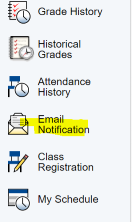
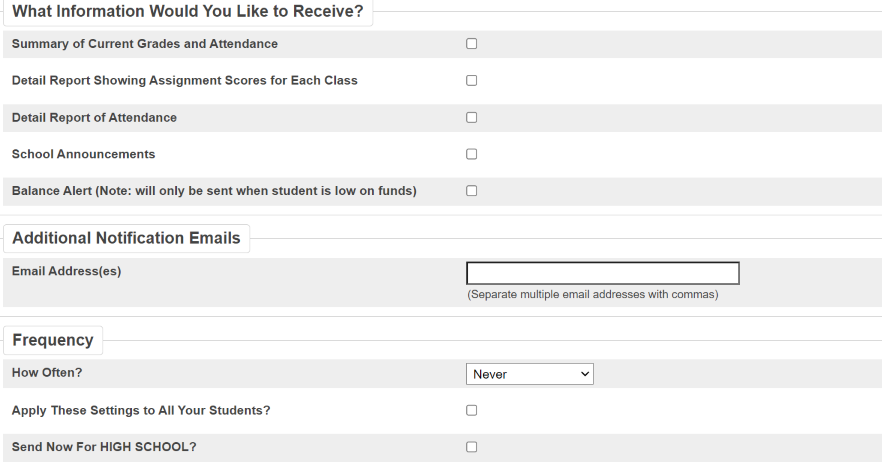
Once you set up a Parent Portal account for your child, you can click the email notification link on the left-side menu to set up the notifications that you want. You can also add additional email addresses, as well as adjust the frequency of your notifications. (See illustrations below.) Parent Portal Sign Up
 |
 |

W.I.N. is designed to provide students with the opportunity to work on assignments, receive support, catch up on reading, or retake tests. It also serves as an advisory period where teachers assist students in checking their grades and addressing any missing assignments.
Another exciting component of W.I.N. is the Character Strong program, where students engage in fun, relevant weekly lessons focused on Social Emotional Learning (SEL). These lessons help students develop important life skills and foster a positive school environment

CharacterStrong is our social emotional learning curriculum. Each week students participate in a lesson from the curriculum during their W.I.N. time.
LINK to an introductory letter.

September 2024 Roadrunner’s Counseling Corner
We are so excited to welcome back returning students and meet our incoming 6th graders and new students. As we near the start of school students may need extra support. The following is a list of tips and links you may find helpful.
Help your child get back on a school friendly schedule. It’s a good time to start having your child wake up closer to the time they will be getting up when school starts and going to bed earlier. Middle school students need to sleep between 8-12 hours each night. One of the biggest differences you can make in your child’s health and well-being is to help them get the sleep they need!
The following link is to an article about how to help your teen get more sleep: Help Teens Get Sleep
Start helping your child get and stay organized starting the first week of school. You can help your student start habits around organization and keeping track of homework and projects by:
Checking in with them often and asking what they did in their classes each day
Helping them find a system that works for them to record homework and due dates (an agenda, Schoology Calendar, keeping a running list)
Looking at Schoology with your child at least once a week
Help your child write emails to teachers with questions relating to class work
Connect with school personnel regarding your student’s needs. Please reach out to your student’s teachers, the school counselors, the school nurse, or our administrators with information that will help your student be successful. We are here to help and support your student.
The following links offer a range of helpful information for parents and guardians:
Even more back-to-school resources!

Welcome to the 2024-2025 school year! I am so excited about the programs happening this school year. In partnership with Goodman, I will be facilitating Good Morning with Goodman, Reading with Roadrunners, daily lunch groups, and supporting our after school homework program Homework Helpers. Stay tuned for information on additional programs being launched this year to support the needs of our students!
Additionally, if you or someone you know are in need of basic needs including (but not limited to) food, clothing/shoes, or shelter, please contact me, Annie Schuster, CIS Site Coordinator, at (253) 530-1661 or annie@cisofpeninsula.org.
Learn more about CIS here
Food Backpacks 4 Kids Free Community Clothing Drive
Click link below for more info: Food Pantry Gig Harbor & Key Peninsula WA | FB4K (foodbackpacks4kids.org)

Fall Sports
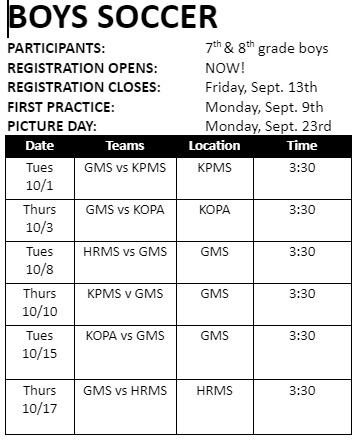
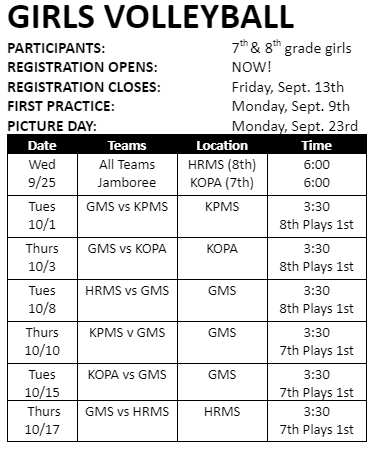
Our first sports season will include Cross Country (6th, 7th & 8th Grades), Girls Volleyball (7th & 8th Grades Only) & Boys Soccer (7th & 8th Grades Only)
There will be tryouts held during the first week of the season. Athletes will need to have an updated Sports Physical in order to participate in any GMS Sports Activities. If you need to check the status of your child's Sports Physical, please contact our Health Room at (253) 530-1624.
 |
 |
|
REGISTER FOR ATHLETICS AT GOODMAN: Please register by going to FinalForms in order to: 1.) Create your parent account 2.) Add your student(s) to your account and select their sport 3.) Sign and submit your required forms to participate in that sport Click on this Parent Playbook for a visual guide to getting started on FinalForms. If you require any support during the registration process, you can: Click the “Get Help” button on the website for FinalForms technical support. Contact our office secretary, Darla Rockstrom at Rockstromd@psd401.net for Goodman support. This will complete the registration process and your student will be ready to participate in athletics at Goodman Middle School. Before the start of the season, we will verify that all required paperwork has been submitted. |
 |
Several products are now on the market that make it easy for kids to disguise and hide e-cigarettes as everyday objects such as pens, smartwatches and more. NBC’s Vicky Nguyen puts parents and teachers to the test to see if they can find the hidden vaping device. Click the link to watch the video: Plain Site-Vape Video Link

If your student is interested in participating in any sports activities this school year we require that they have a current physical on file. Physicals are good for 2 years. If you believe their physical is expired or will expire soon, or do not have one on file please be sure to schedule an appointment with your child's physician and return a copy of their physical before the start of the sports activity they are interested in.
Please contact me if you have any questions or concerns at (253) 530-1624, or email me at Kilgorel@psd401.net

GOODMAN MIDDLE SCHOOL VPO BOARD MEMBERS 2024-2025
To contact the Board, email: president@goodmanvpo.org
If you are interested in being involved, please fill out our Volunteer Form: Volunteer Form
Be sure to stop by the VPO table during the “back to school day” to stock up on spirit wear, stickers, and sign up to be on the volunteer email list.
The volunteer email list is how we keep in touch! It is how we let families know about VPO activities and provides information on how to volunteer and be involved with the Goodman Community!
We look forward to meeting you!
Be sure to stop by the VPO table during the “back to school day” to stock up on spirit wear, stickers, and sign up to be on the volunteer email list.
The volunteer email list is how we keep in touch! It is how we let families know about VPO activities and provides information on how to volunteer and be involved with the Goodman Community!
We look forward to meeting you!
|

|
|
|

|

|
|
|

Tuesday, September 3rd, First Day of School
Wednesday, September 25th, Volleyball All Teams Jamboree, HRMS(8th)/KPMS(7th) 6:00 Start
Thursday, September 19th, Goodman Open House 5:30-7:00 pm
Monday, September 23rd Makeup Picture Day
Monday, September 23rd Sports Pictures (After School)
Tuesday, October 1st, Boys Soccer & Girls Volleyball First Away game @ KPMS 3:30 Start
Wednesday, TBD, Cross Country First Meet @ TBDt
Thursday, October 3rd, Boys Soccer & Girls Volleyball Away game @ Kopa MS 3:30 Start
Tuesday, October 8th, Boys Soccer & Girls Volleyball First Home game vs. HRMS 3:30 Start
Wednesday, TBD, Cross Country Meet @ TBD 3:30 Start
Thursday, October 10th, Boys Soccer & Girls Volleyball Home game vs. KPMS 3:30 Start
Tuesday, October 15th, Boys Soccer & Girls Volleyball Last Home game vs. Kopa 3:30 Start
Wednesday, TBD, Cross Country Meet @ TBD 3:30 Start
Thursday, October 17th, Boys Soccer & Girls Volleyball Last Away game vs. HRMS 3:30 Start
Wednesday, TBD, Cross Country Meet @ TBD 3:30 Start
HELPFUL LINKS
Goodman Middle School Web Page
Parent Square Information
Power School Parent Portal
Parent Volunteer Information